
 LOOKING TO ELEVATE YOUR LINKEDIN PROFILE? GET NOTICED FOR YOUR HARD WORK WHEN YOU PUBLISH YOUR NCTI ACCOMPLISHMENTS!
Just a few easy steps to enhance your professional profile and get recognized for your efforts in pursuing excellence in your role and life-long learning.
For PC/laptop users:
1. Create or log into your LinkedIn account
2. Select your profile picture
3. Select “Add profile section”
4. Within the pop-up window, select “Recommended”
5. Add your NCTI course and/or industry recognized certification
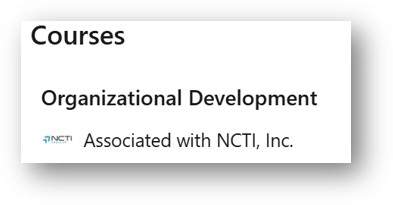
6a. To add a passed NCTI course, select “Add courses”, complete the section, and save.
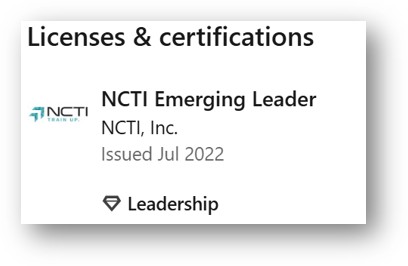
6b. To add an NCTI certification (e.g., Master Technician, Master Representative, Emerging Leader, Master Dispatcher), select “add licenses or certifications”, complete the section, and save.
If you need to confirm your course or certification graduation date, log into Amp or call/chat/email with the NCTI Customer Care team!
Want a LinkedIn how-to? Click here
Congratulations on your educational milestones and we wish you continued success!
NCTI Customer Care Team